










How to Make a Business Presentation: A Complete Guide
- Different presentation types demand tailored approaches.
- Use an AI presentation generator to effectively communicate your message, automate your design, and persuade your audience instantly.
- By avoiding overloading slides with text and ignoring your audience's needs, you can make sure your presentation will convert.
- Remember, practicing delivery significantly improves presentation effectiveness.
You know your content inside and out, but translating that knowledge into slides is a whole different challenge. One poorly designed presentation can undermine months of hard work in front of your boss.
But how to make a business presentation? In our complete guide, you’ll learn about different presentation types and how to master presentation skills, but we’ll also share some valuable business presentation tips.
What is the Purpose of a Business Presentation?
Convincing business presentations are strategic communication tools that are supposed to be informative and motivate your audience to act. You’ll soon realise that leveraging a smart AI presentation generator delivers better ROI by eliminating expensive agency fees and hours of manual design work.
For example, conference and keynote presentations position you or your organization as thought leaders as you share valuable insights. Sales presentations aim to convert leads into customers by demonstrating value and handling objections. Finally, investor pitch decks seek to secure funding by promoting market opportunities and showcasing growth potential.
Types of Business Presentations
Let’s see 3 distinct types of business presentations up close.
Informative Presentations
Informative presentations’ primary goal is sharing knowledge with your audience without necessarily asking for a specific action. When they’re effective, they clearly explain concepts, processes, or data. They do so by organizing complex information logically and using clear data visualizations. They succeed when audiences leave with an accurate understanding of the topic and can apply that information in their work.
Persuasive Presentations
Persuasive business presentations aim to influence audience opinions, decisions, or behaviors by presenting compelling arguments and evidence. They present logical arguments while appealing to listeners’ emotional sides. For instance, sales presentations show potential clients how your product or service can solve certain problems.
These presentations include customer pain points, solution features, success stories, competitive advantages, and calls to action, while investor presentations must be brief, topical, and concentrate on your business opportunity and competitive advantage. Remember to make financial forecasts and demonstrate team capabilities. Decksy’s AI platform can instantly offer the professional design quality that you need in stakeholder situations where you are competing to get attention and capital.
Demonstrative Presentations
Demonstrative presentations show audiences how something works through detailed walkthroughs or live demonstrations. Product demos and technical workshops are great examples of this kind of presentation. Such formats emphasize practical application and use screen recordings or live demonstrations to support verbal communication.
Tips for Giving an Effective Business Presentation
Here are our tips to make your business presentations stand out.
Start with Clear Goals
You need to establish what your audience wants to know, feel, and do at the end of your presentation. To do this, you must have clear objectives in mind.
Know Your Audience
Research your audience’s level of knowledge, priorities, decision-making criteria, and concerns before you write your presentation.
Follow the 10-20-30 Rule
Legendary VC Guy Kawasaki suggests that presentations should have 10 slides, take no more than 20 minutes, and have a minimum font size of 30 points. This structure compels you to adhere to concise and crucial information while making it readable and memorable.
Create a Narrative Arc
Organize your presentation as a story with a beginning, middle, and end. This form of narration makes tales especially easy to read and recall. Use AI to instantly structure and generate your PowerPoint presentation for maximum impact.
Use the Pyramid Principle
Busy executives prefer to know your key takeaways straight away. By adopting this approach, you ensure that your core message is received.
Maintain Visual Harmony
Create brand-aligned templates, using consistently polished fonts, colors, layouts, and design throughout your deck.
Consciously Use White Space
Resist the temptation to fill every inch of slide space. White space improves readability and directs attention.
Replace Bullet Points with Visuals
Always use infographics instead of a list of bullets with a lot of text.
Tell Stories Using Data
Explain what numbers stand for and why they matter. Highlight patterns and trends to guide interpretation and comparison.
Design for Scannability
Use hierarchical typography with large headlines that communicate main points.
Practice Purposeful Repetition
Reinforce critical messages by restating them to improve retention levels. In other words, discuss the same topic in other ways or with supporting evidence.
Prepare for Technical Difficulties
Always have backup plans for technology failures. Save presentations in different formats and locations (USB drive, cloud storage, email).
End with Next Steps
Conclude every business presentation by coming up with specific actions, responsibilities, and timelines.
What Should Definitely Be Included in a Business Presentation?
Although the exact content depends on the type of presentation, some aspects are included in almost all business presentations. Here are our guidelines.
A Compelling Title Slide
Include in your opening slide the following elements:
- your presentation title;
- your name and role;
- your company name and logo;
- the date;
- and possibly your audience’s name.
An Agenda or Roadmap
At the beginning of your presentation, disclose what you are going to discuss and in what sequence. This helps audiences follow your logic from the very beginning.
Problem Statement
Openly express the challenge, opportunity, or questions your presentation deals with. Base your presentation on issues that your audience can relate to.
Transparent Data and Evidence
Support claims using credible data, research, and examples. Quantify benefits and impacts whenever possible.
Visual Hierarchy and Design Elements
Communication effectiveness should be supported by professional design. When crafting your layouts, make the most of typography, color, size, and positioning.
Call to Action
Make your desired action explicit, concrete, and feasible. Strong CTAs convert attention into outcomes.
How to Start a Business Presentation?
Open with a hook to immediately capture your audience’s attention. Options include:
- surprising statistics;
- provocative questions;
- relevant anecdotes;
- bold statements;
- current events.
After your hook, briefly share relevant experience, credentials, and achievements that help you qualify to present this content. This positioning is expected to help audiences trust your expertise.
Set clear expectations for what audiences will learn from your presentation. Say something like “By the end of this presentation, you’ll…” Thus, transition smoothly to your main arguments using your agenda or roadmap as a bridge.
Connect with your audiences. Make eye contact, smile, and engage them by acknowledging shared experiences or challenges.
Mistakes to Avoid in Business Presentations
We compiled a list of errors to avoid in business presentations.
Stuffing Slides with Text
Dense text slides oblige audiences to choose between reading and listening. Limit text to just a few keywords per slide, while providing contextual information orally.
Ignoring Audience Knowledge and Needs
Always consider the audience, their views, concerns, and level of expertise. Get to know your audience in advance and prepare content accordingly.
Poor Time Management
Speaking much longer than you are supposed to shows a lack of preparation and disrespect to your audience.
Underestimating the Power of Stories
Presentations that rely exclusively on facts and figures, void of a human touch, feel dry and forgettable. Bring up customer examples or anecdotes that directly relate to your personal life. This way, you’ll activate emotional engagement and clarify concepts.
Failing to Anticipate Questions and Objections
Anticipate likely pushback and build responses directly into your presentation or prepare thorough answers for Q&A. This will show that you’ve applied critical thinking to your topic.
[BONUS] 5 Best Business Presentation Examples to Inspire You
To understand what works in a real-world context, let’s examine some successful business presentation ideas.
Airbnb’s Original Pitch Deck
Airbnb’s 2008 investor pitch deck showed exactly why people needed their service and how they would build a sustainable business. Despite basic design by today’s standards, the deck succeeded because of a crystal-clear value proposition and logical information flow.
Zuora’s Subscription Economy Presentation

Zuora effectively educated audiences in 2016 about the “Subscription Economy” market shift affecting all industries. Their thought leadership presentation added a new urgency to the problem they solved, and positioned their solution as inevitable.
LinkedIn’s Series B Pitch Deck
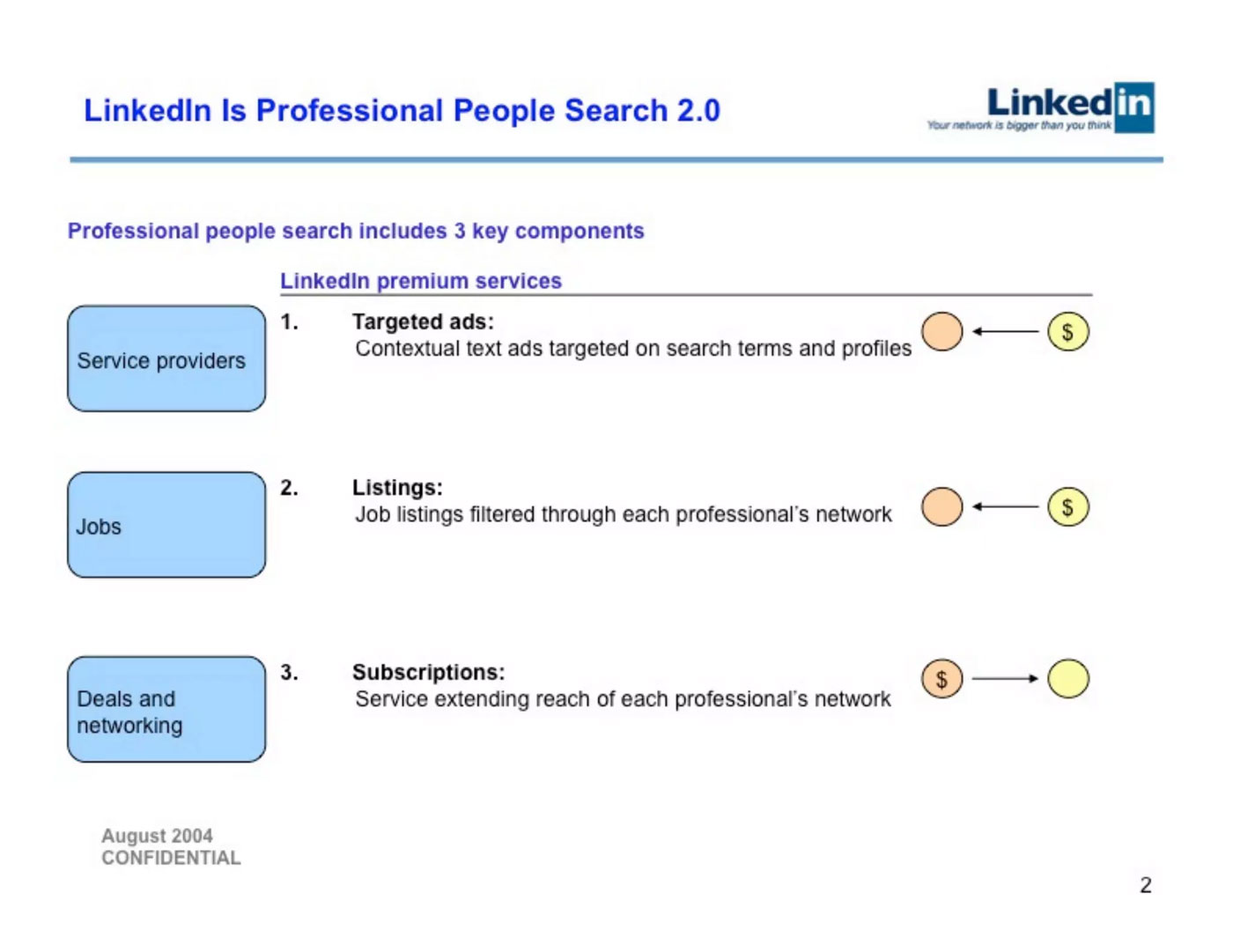
LinkedIn’s 2004 Series B presentation to investors balanced quantitative data about user growth and engagement with qualitative insights. The deck used consistent visual solutions and data visualization to outline their vision for professional networking and showcase growth metrics.
WeWork’s Investor Presentations

WeWork’s 2014 investor presentations adopted visual storytelling to create anticipation and excitement. They combined striking photography, bold typography, and aspirational messaging to sell a vision beyond office space rental.
Tesla’s Master Plan Presentations

Elon Musk’s various Tesla Master Plans (2006-2025 to date) feature product demonstrations to create aspirational narratives about EV mobility. These presentations make extensive use of storytelling and high-quality visuals to make engineering interesting for non-experts.
Conclusions
When preparing sales pitches, conference presentations, or investor decks, you must structure content logically. But that’s not enough. You should also aim for clarity and deliver with confidence. All in all, presentations that truly convert used to require specialized design skills and time investment—but with Decksy’s AI generator, you can achieve that professional impact in seconds.
FAQ
What is the format for a business presentation?
Standard business presentation formats include PowerPoint, Keynote, Google Slides, and Prezi. Most corporate environments use PowerPoint due to widespread compatibility, while startups often prefer Google Slides to collaborate with colleagues.
How to create a business presentation?
Before you start creating slides, outline your main points. Then, design slides that work as cues during your live delivery. As a speaker, rehearse multiple times to improve your time management and prepare for questions by anticipating likely feedback and objections. Finally, test all technology beforehand and prepare backup plans.
What are the 5 P’s of presentation?
The 5 P’s framework for presentation success are: Planning; Preparation; Practice; Performance; Passion.
How long should a business presentation be?
Investor pitches typically run 10-15 minutes plus Q&A. Sales presentations range from 30 to 45 minutes. Conference talks usually last 20-30 minutes.
What makes a business presentation persuasive?
If you are wondering how to make an effective business presentation that is also persuasive, you should know it’s important to discuss problems audiences care about before presenting solutions. To support claims, use compelling evidence like case studies and testimonials. For more inspiration, you can consult our AI presentation showcase to see what Decksy can generate for you.

On Decksy.com, where clarity still matters, but results matter just as much, Alyssa Johnson, Chief Revenue Officer, looks at messaging through a growth lens. She pays attention to how structure drives action, how a well-timed pause improves conversion, and how AI is reshaping all of it — without ever replacing the human instinct behind the message.